The first time I used AI inside PhantomStudio, I asked it to change which categories a product module showed. The change went through, at a cost of roughly €5. I could have made it myself in three clicks. Some prompts that day came close to €20.
The tool was working as designed. I had chosen the most expensive way of using Claude, unaware that a cheaper one existed. This post covers what I learned getting from there to a setup that is cheap, fast and connected to my WordPress data. It is less a tutorial than an account of the obstacles I met, in the order I met them. My tools are PhantomStudio and Claude, but most of what follows applies to any AI coding agent, any MCP client and any project developed in Docker; the section “If you use other tools” gives the equivalent names. Prices, plans and their limits change; the figures here come from my own account in October and November 2026.
Why the API burns money
PhantomStudio’s agent mode runs on your own Anthropic API key, and the API bills every token. That seems reasonable until one looks at how an agent consumes them.
- Every step re-sends everything. An agent reads files, edits, checks, reads again. Each of those steps sends the whole conversation and project context back to the model. My usage showed roughly 70 tokens in for every token out. Most of the bill was for re-reading rather than writing.
- The cache expires fast. Caching softens this, and mine hit almost every time. But PhantomStudio uses the short five-minute cache. Pause to look at the preview, come back, and the full context gets written to the cache again at a premium.
- The top model was doing small jobs. Most of my daily spend came from the most capable model, even though a cheaper one handled more of the work. Changing a category filter does not need the best reasoning model available.
The Console’s Usage and Cost pages showed all of this, broken down by model and by hour. One warning: the two charts use different colours for the same model, which cost me some time before I noticed.
A cheaper model helps. The larger saving came from not paying per token at all.
Switching to the subscription
PhantomStudio keeps your site in your own GitHub repo. This matters, because any tool that can edit the repo can do the AI work. Claude Code, Anthropic’s command-line tool, can use a regular Claude subscription instead of an API key. For routine editing, the subscription goes considerably further per euro. It is not unlimited: usage is counted in windows of a few hours and across the week, and long agent sessions can reach the limit. One of mine stopped halfway through a task and had to be picked up again the next day.
On Windows, the install is one line in PowerShell:
irm https://claude.ai/install.ps1 | iexThe first problem appeared at once. The installer said it worked, and claude still was not recognised. PowerShell only reads your PATH when it starts, so the window you installed from never learns about the new command. Close the terminal completely and open a new one. If you work in an editor’s built-in terminal, restart the whole editor. If it still fails, check that claude.exe exists in %USERPROFILE%\.local\bin and add that folder to your user PATH.
The second problem is less visible and more costly. When you first run claude, it asks how to log in. Choose your Claude account, not the Console/API option, or you are back to paying per token. And if an ANTHROPIC_API_KEY environment variable is set anywhere on your machine, Claude Code asks once whether to use it; agree, or have agreed months ago and forgotten, and it bills the API from then on without asking again. Run /status inside Claude Code to see which account you are using.
One temptation is worth resisting: running the terminal as administrator. It fixes none of the problems above, since the installer works per user. It also means that every command Claude Code runs on your behalf carries full rights over the machine. A normal terminal is sufficient, and safer.
One name, two tools
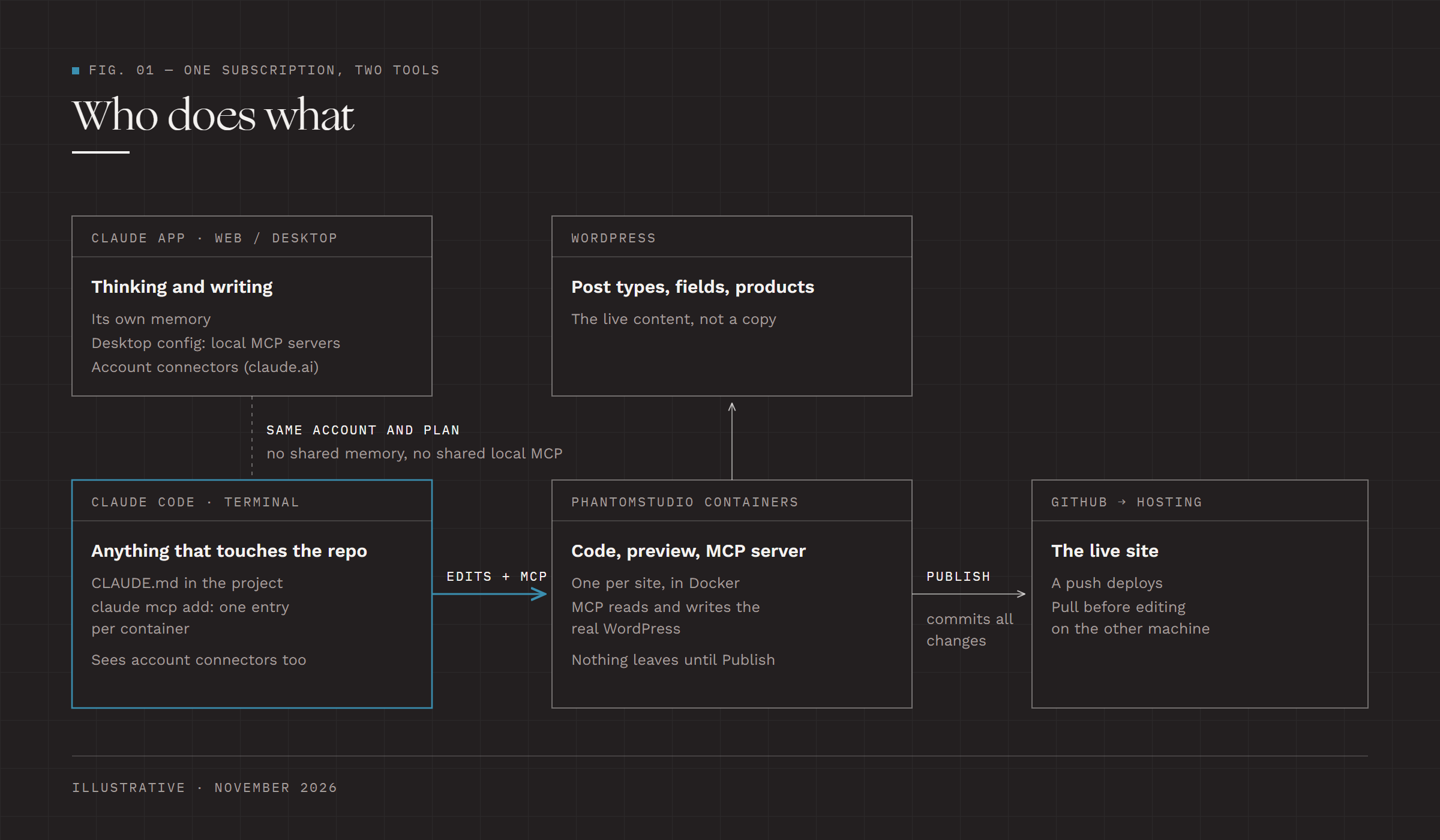
The hardest part was not technical. It was understanding that “Claude” covers two different things. The Claude app, on the web or the desktop, is where I chat, research and write. Claude Code works inside a project folder: it reads and edits files and runs commands. Both use the same account and the same subscription, and they increasingly appear side by side in the same apps. Conceptually, they feel like one product.
In practice they do not share a memory. What the chat app knows about me and my projects does not reach Claude Code, and the reverse holds too. They also keep separate lists of local connections. An MCP server added to Claude Desktop’s config file is invisible to Claude Code, which has its own claude mcp add. I set up the same Phantom connection in both before I understood why one could not see what the other already had. On a Mac, claude mcp add-from-claude-desktop copies the Desktop entries across. Connectors added on claude.ai are a different matter: they belong to the account, and Claude Code sees them when it is signed in with that account.
The rule I now follow: the chat app for thinking and writing, Claude Code for anything that touches the repo. Whatever Claude Code needs to know about a project, such as its structure or what not to touch, goes into a CLAUDE.md file in the repo, where it travels with the code.
Connecting Phantom’s MCP
Editing code is half the job. The other half is knowing what is in WordPress: post types, fields, products. PhantomStudio’s local container ships an MCP server, a small bridge that lets Claude ask WordPress questions directly instead of guessing from code.
In Claude Code, adding it is one command (use your own container name):
claude mcp add --scope user my-phantom-site -- docker exec -i -w /app my-phantom-site node /app/.phantomwp/mcp/server.mjsWithout --scope user, the server is saved for the folder you happened to start Claude Code in, and it disappears when you start somewhere else. Docker Desktop has to be running and the container has to be up; a container that is stopped shows as “failed to connect” when Claude Code starts, which is harmless. Inside Claude Code, /mcp tells you whether the connection works, and reconnects once the container is running.
The server does more than read. Its tools can create posts, register post types and fields, and delete content they created, and they talk to the real WordPress, not a copy. I treat it as access to the live site and approve each change it wants to make.
In Claude Desktop, the same server goes into a config file, and that is where I made my mistake. I pasted the new entry as a second mcpServers block below the existing one. That is invalid JSON, and the app failed at startup. There must be exactly one mcpServers object, with every server listed inside it:
{
  "mcpServers": {
    "shop-one": { "command": "docker", "args": ["exec", "-i", "-w", "/app", "shop-one", "node", "/app/.phantomwp/mcp/server.mjs"] },
    "shop-two": { "command": "docker", "args": ["exec", "-i", "-w", "/app", "shop-two", "node", "/app/.phantomwp/mcp/server.mjs"] }
  }
}
After editing, quit Claude Desktop from the system tray. Closing the window is not enough.
Two checks save a lot of time. docker ps shows the exact container name, and one wrong letter breaks everything. Running the docker exec command by hand tells you whether the problem is the server or your config.
For some time I assumed that each container needed its own Claude session. Working on three shops meant three terminal windows, each connected to one store. That is a perfectly reasonable arrangement if you prefer to keep projects visibly apart. Each container can also be added as an MCP server under its own name, as above, and a single session can then reach all of them.
Where Claude Code does its editing
It took me a while to ask which copy of the code Claude Code was changing. PhantomStudio can keep a project’s code in a Docker volume, inside Docker only, or in a folder on your own disk that the container works on. With a volume, the only working copy is inside the container, and Claude Code edits it through docker exec. With a folder on disk, or a separate clone, it edits files there, and git has to carry the change to wherever PhantomStudio is looking.
Either works, but two copies can drift apart, and a change made in one can appear to vanish when the other is saved or reloaded. Knowing which copy each tool uses removes most of that confusion.
With the code in a volume, nothing leaves the container until it is published. PhantomStudio’s Publish commits everything that has changed in the project, including edits Claude Code made that I may not have reviewed yet, and the push deploys the live site. I now look at the list of changed files before pressing it.
One more trap belongs here, because it happens inside a single container. Running npm install while the preview server is running once left every image failing with “Could not find Sharp”, until the server was restarted. I now stop the server first, or restart it after any package change.
Two machines do not share a container
Working across a Mac and a Windows PC brings a separate set of problems. Docker state, the .env file and the MCP configuration all stay on the machine where they were set up. GitHub carries the code; everything else has to be rebuilt on the other side. In my case that has included:
- Git starting from scratch. On my main computer the container persists and git remembers everything. On the second machine, a freshly built container greeted me with “author identity unknown” and “dubious ownership”. Both are fixed from outside with
docker exec, run as the app user rather than root:docker exec -u phantomwp <container> git config --global --add safe.directory /app, then the same for youruser.nameanduser.email. Every git command should run that way: on one project, git commands run as root left files in.gitthat PhantomStudio could no longer read, and publishing failed untilchown -R phantomwp:phantomwp /app/.gitgave them back. - Tokens that do not travel. On my main machine the Phantom token has stayed valid. On the second, the token in an older “Start Locally” command had expired, and publishing failed with a GitHub authentication error. The fix is a fresh token from “Start Locally”, not the old command run again.
- Packages built for the wrong system. When the container works on a project folder on the host’s disk, both share one
node_modulesfolder. Runningnpm installon Windows fills it with Windows builds the container cannot use, and pages stop rendering. Deletenode_modulesand.astro, restart the container, and leave package installation to the container from then on. Keeping the code in a Docker volume avoids this, and on Windows it also starts far faster: one project took about eight minutes to start from a folder on the Windows disk. - Line endings. Windows git converts line endings by default, and some projects mix files saved with Windows and Unix endings. Editing from the wrong side turns a one-line change into a change to every line of the file.
- Missing environment and connections. The
.envfile and the Claude Desktop MCP entry have to be recreated by hand, or nothing connects. - Two copies drifting apart. Uncommitted work on one machine does not exist on the other. Committing and pushing before switching is the only reliable habit.
I have written a start-up script for each machine. It pulls the latest code, gets a fresh token, recreates the container and reapplies the git fixes. It has removed some of the friction, though not all of it. This is a part of the setup I am still working out.
If you use other tools
Most of this is not specific to PhantomStudio or Claude. The names change from tool to tool, and the problems stay much the same.
- Paying per token. Any agent that runs on your own API key bills the same way: Cline, Aider, or Cursor and VS Code used with your own key. The cost comes from the same three places: re-sent context, a short cache and the top model doing small jobs. Flat-price plans from Cursor, GitHub Copilot, OpenAI and Anthropic swap the bill for usage limits, and OpenAI’s tools read an
OPENAI_API_KEYmuch as Claude Code readsANTHROPIC_API_KEY. - Instructions for the agent.
CLAUDE.mdhas equivalents:AGENTS.md, read by OpenAI’s Codex and a growing number of other agents,.cursor/rulesin Cursor and.github/copilot-instructions.mdfor Copilot. Keeping one file and pointing the others at it saves keeping them in step. - Chat and agent. ChatGPT and Codex, or Cursor’s chat and its agent, are separate in the same way as the two Claude tools, and the same rule applies: the project’s own instruction file is the only memory that travels with the code.
- MCP. Claude Desktop, Claude Code, Cursor, VS Code and Windsurf each keep their own MCP configuration in their own file, so a server added in one is invisible in the others, and a mistake in the JSON breaks only that app. VS Code’s file even names the block
serversrather thanmcpServers. A server that can write to a live system deserves the same caution in every one of them. - Docker. Root-owned files, git’s ownership check, line endings, slow folders shared with Windows and
node_modulesbuilt for the wrong system turn up in any containerised project, with or without AI. An agent runs more commands than a person, so it meets them sooner. - Publishing. The Publish button is PhantomStudio’s own, but the question behind it is general: which copy of the code is the working one, and what leaves it when. Any tool that keeps a working copy apart from the repository raises it.
Hosted AI builders such as Lovable, Bolt or v0 avoid the local machine and Docker problems altogether. In exchange, the pricing is in credits and the code lives on their platform unless you connect it to GitHub or export it.
How I split the work now
- PhantomStudio handles the WordPress connection, previews, publishing and deploy settings.
- Claude Code on my subscription does the AI edits, with Phantom’s MCP so it can see the WordPress data.
- Git connects the two. I pull before editing in either place, and I check the change list before publishing, so they rarely drift apart.
None of these problems was difficult in itself. Each cost an evening, chiefly because I did not know it was there. They are recorded here for whoever meets them next.